Fibonacci Calculator App

Get Fibonacci levels in seconds

Enter your High and Low, tap CALCULATE and get every retracement and extension level for an uptrend, a downtrend or both.

  • Stocks
  • Crypto
  • Forex
  • Commodities
  • F&O
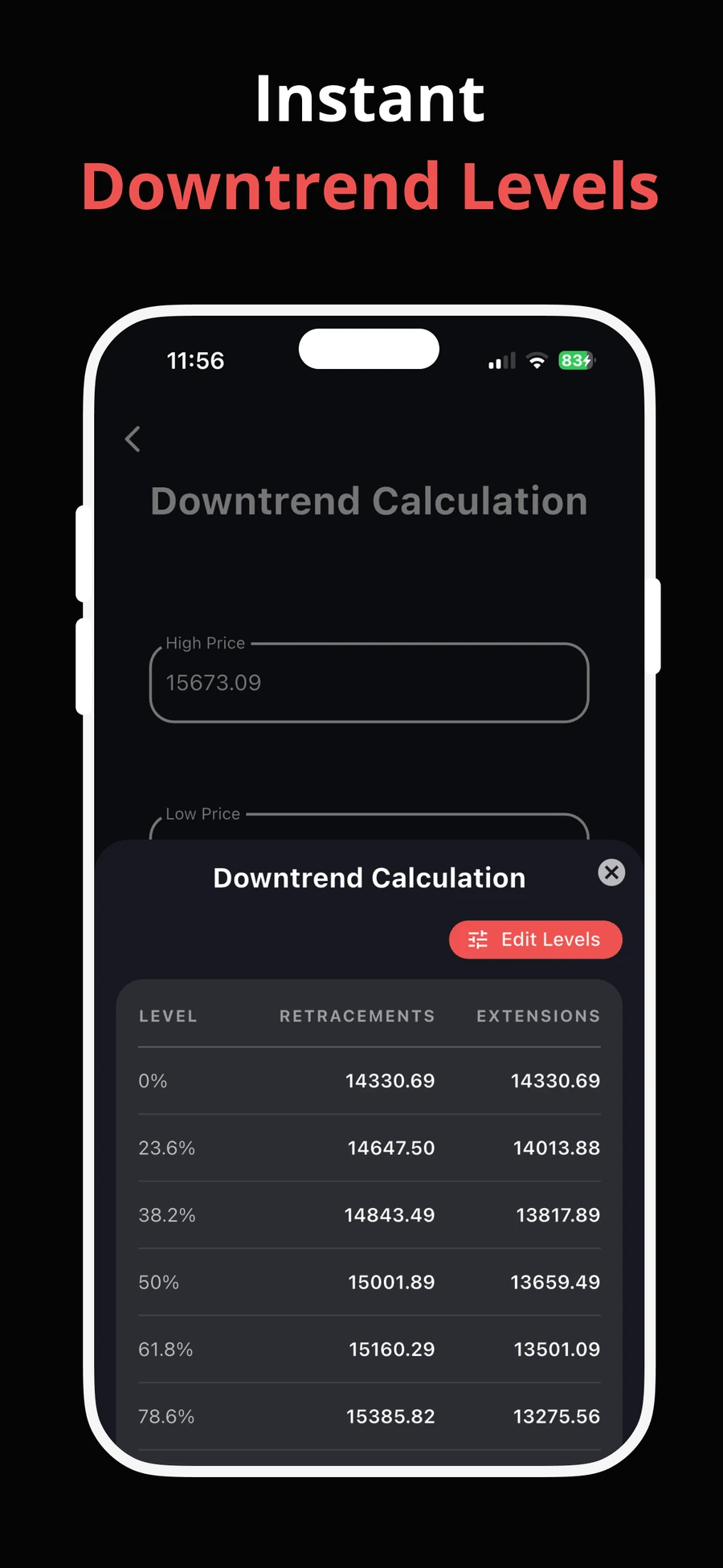
Downtrend results under the caption Instant Downtrend Levels. The table lists retracements and extensions: 14330.69 and 14330.69 at 0%, 14647.50 and 14013.88 at 23.6%, 14843.49 and 13817.89 at 38.2%, 15001.89 and 13659.49 at 50%, 15160.29 and 13501.09 at 61.8%, 15385.82 and 13275.56 at 78.6%.
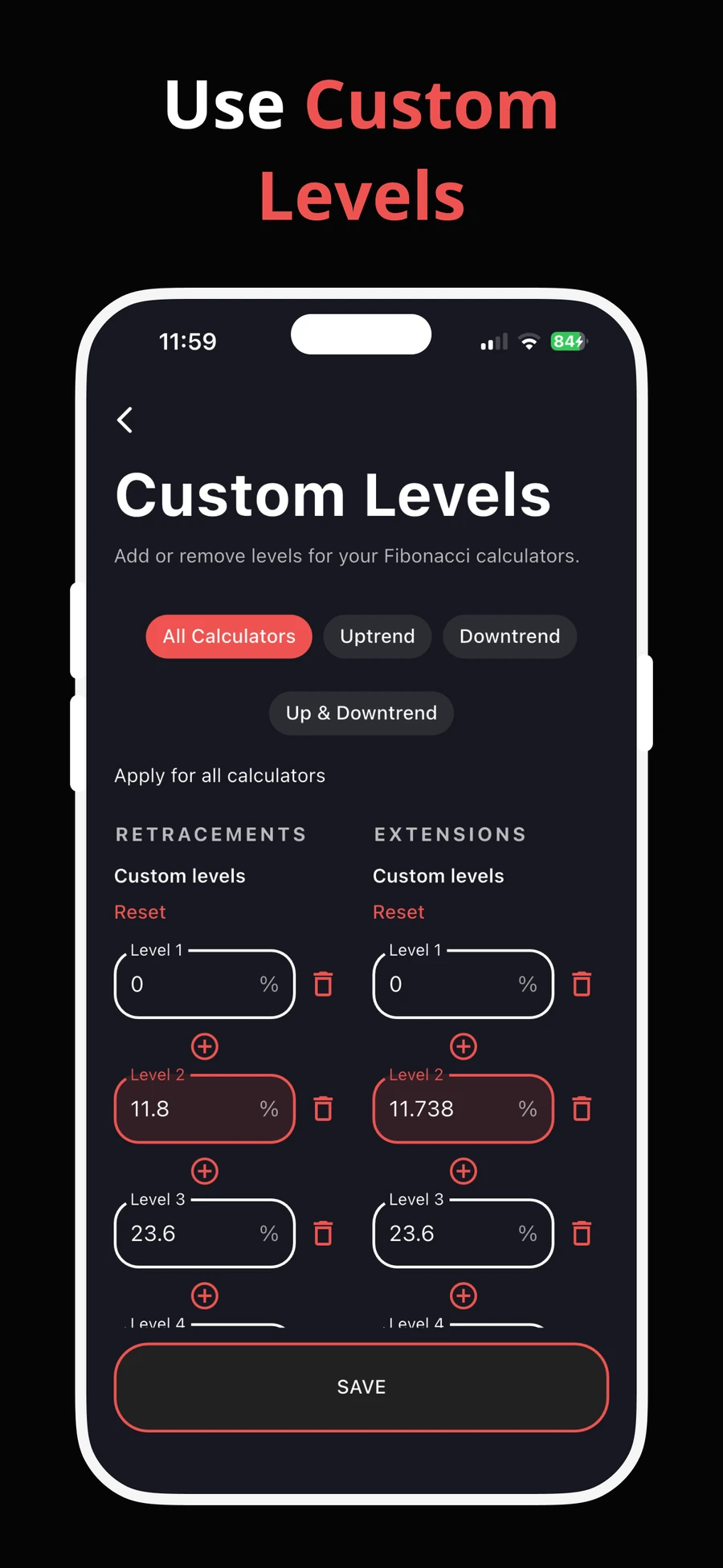
The Custom Levels screen under the caption Use Custom Levels. Tabs read All Calculators, Uptrend, Downtrend and Up & Downtrend, above Retracement and Extension lists of levels with add, delete and Reset controls and a SAVE button.
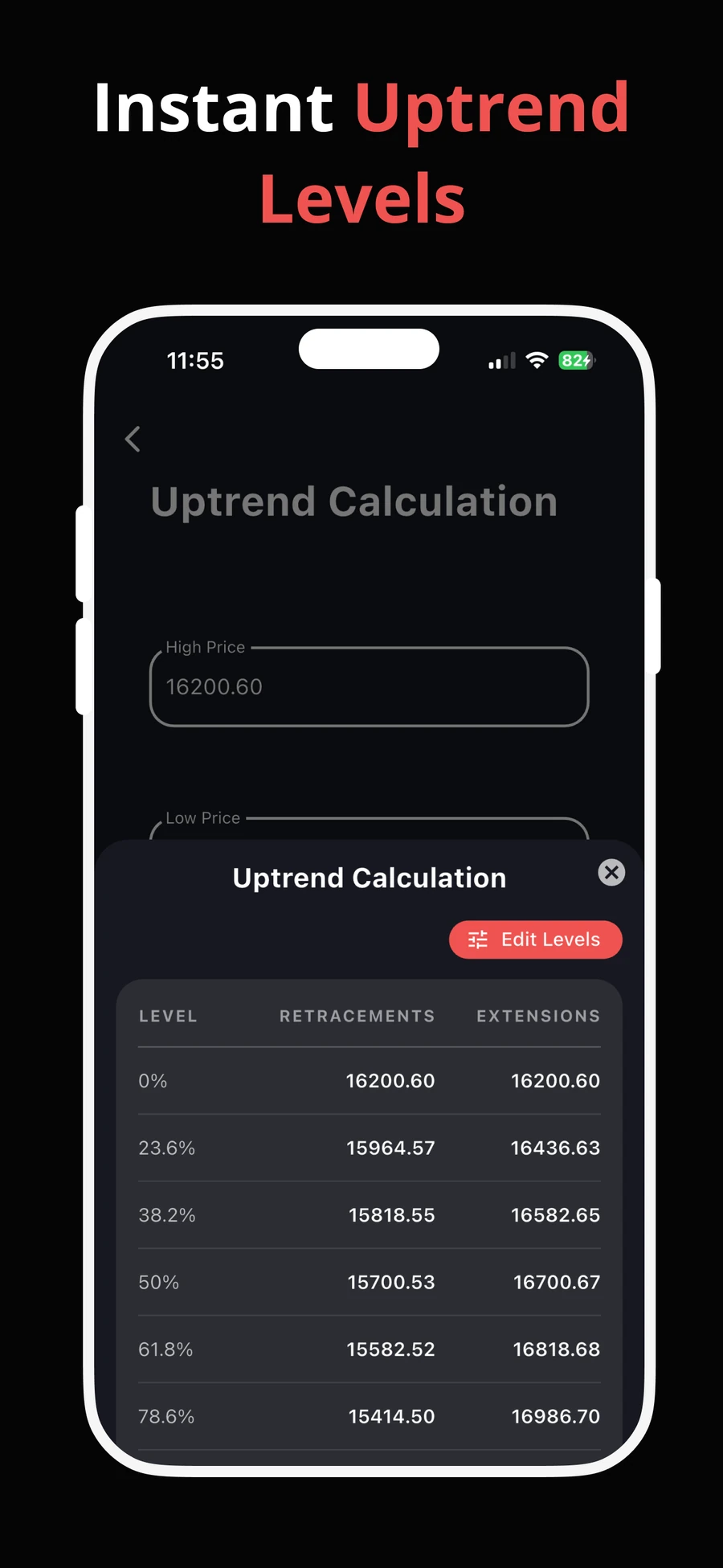
Uptrend results under the caption Instant Uptrend Levels. The table lists retracements and extensions: 16200.60 and 16200.60 at 0%, 15964.57 and 16436.63 at 23.6%, 15818.55 and 16582.65 at 38.2%, 15700.53 and 16700.67 at 50%, 15582.52 and 16818.68 at 61.8%, 15414.50 and 16986.70 at 78.6%.
  • 2 pricesare all you enter
  • 9 levelscalculated in one tap
  • 3 calculatorsfor up, down or both
  • 0 formulasto remember

Three ways to calculate

Choose the one that matches the move on your chart. Each one needs just a High and a Low.

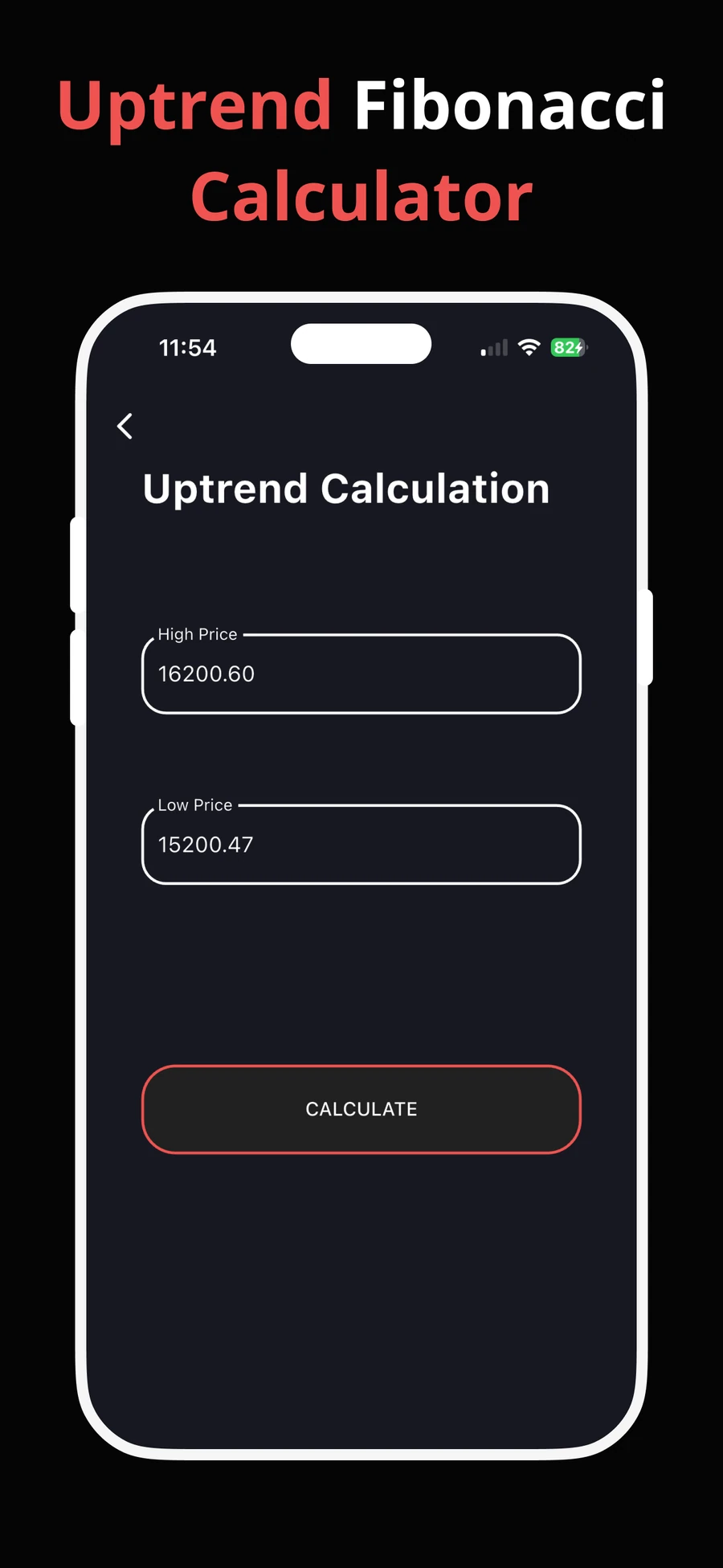
The Uptrend Calculation screen under the caption Uptrend Fibonacci Calculator. High Price reads 16200.60 and Low Price reads 15200.47, above a CALCULATE button.Uptrend results under the caption Instant Uptrend Levels. The table lists retracements and extensions: 16200.60 and 16200.60 at 0%, 15964.57 and 16436.63 at 23.6%, 15818.55 and 16582.65 at 38.2%, 15700.53 and 16700.67 at 50%, 15582.52 and 16818.68 at 61.8%, 15414.50 and 16986.70 at 78.6%.

Find pullbacks and targets in a rising market

Enter the High and Low of the rise and tap CALCULATE. The Uptrend calculator counts retracements down from the High to show where a pullback may pause, and extensions up from the High to show where the rise may head next.

  • Get nine levels from two prices
  • Read retracements and extensions side by side
  • Change a price and calculate again in one tap
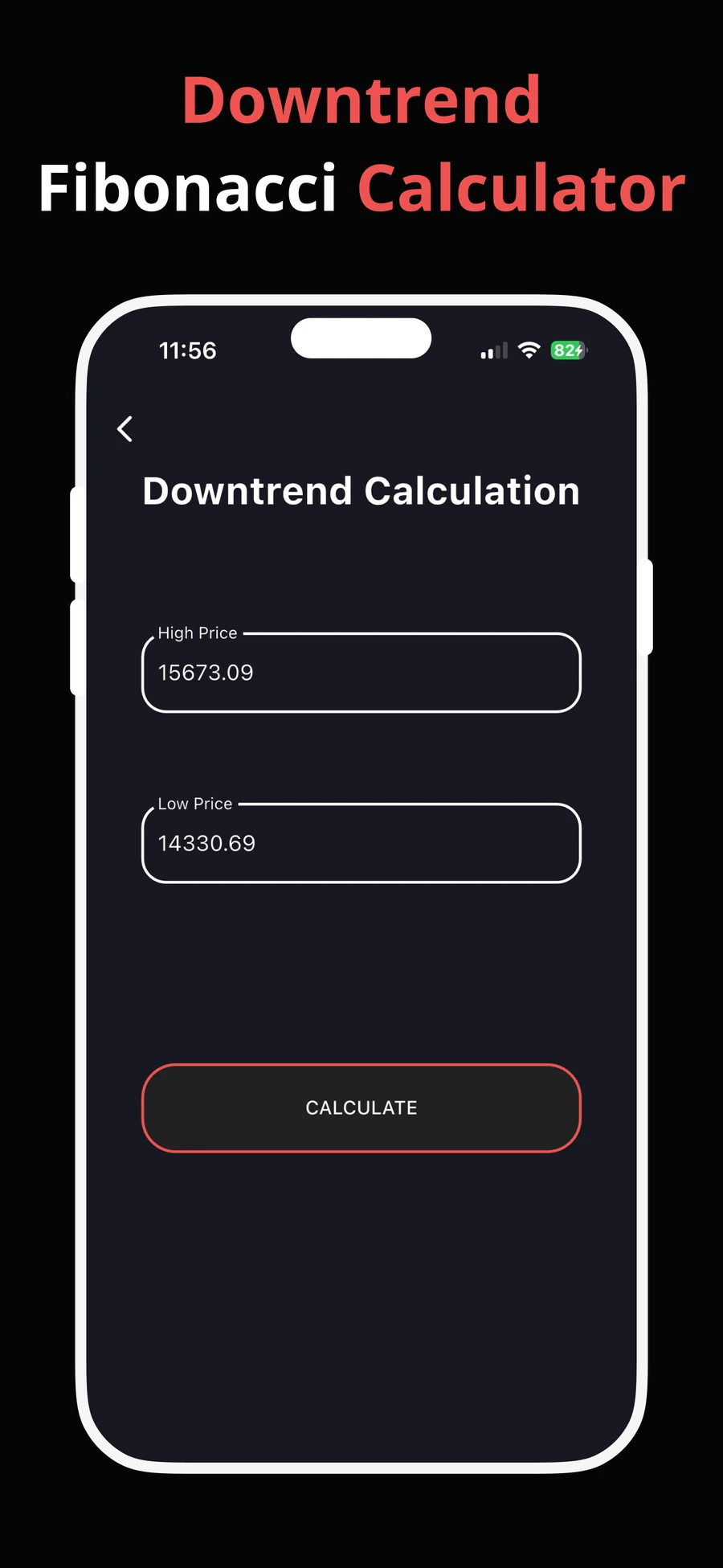
The Downtrend Calculation screen under the caption Downtrend Fibonacci Calculator. High Price reads 15673.09 and Low Price reads 14330.69, above a CALCULATE button.Downtrend results under the caption Instant Downtrend Levels. The table lists retracements and extensions: 14330.69 and 14330.69 at 0%, 14647.50 and 14013.88 at 23.6%, 14843.49 and 13817.89 at 38.2%, 15001.89 and 13659.49 at 50%, 15160.29 and 13501.09 at 61.8%, 15385.82 and 13275.56 at 78.6%.

Find bounces and targets in a falling market

The Downtrend calculator measures from the Low. Retracements count up to show where a bounce may stall, and extensions count down to show where the fall may go next. You enter the same two prices.

  • Get levels measured the right way for a falling price
  • Spot resistance on the bounce and targets below the Low
  • Use the same nine levels as Uptrend
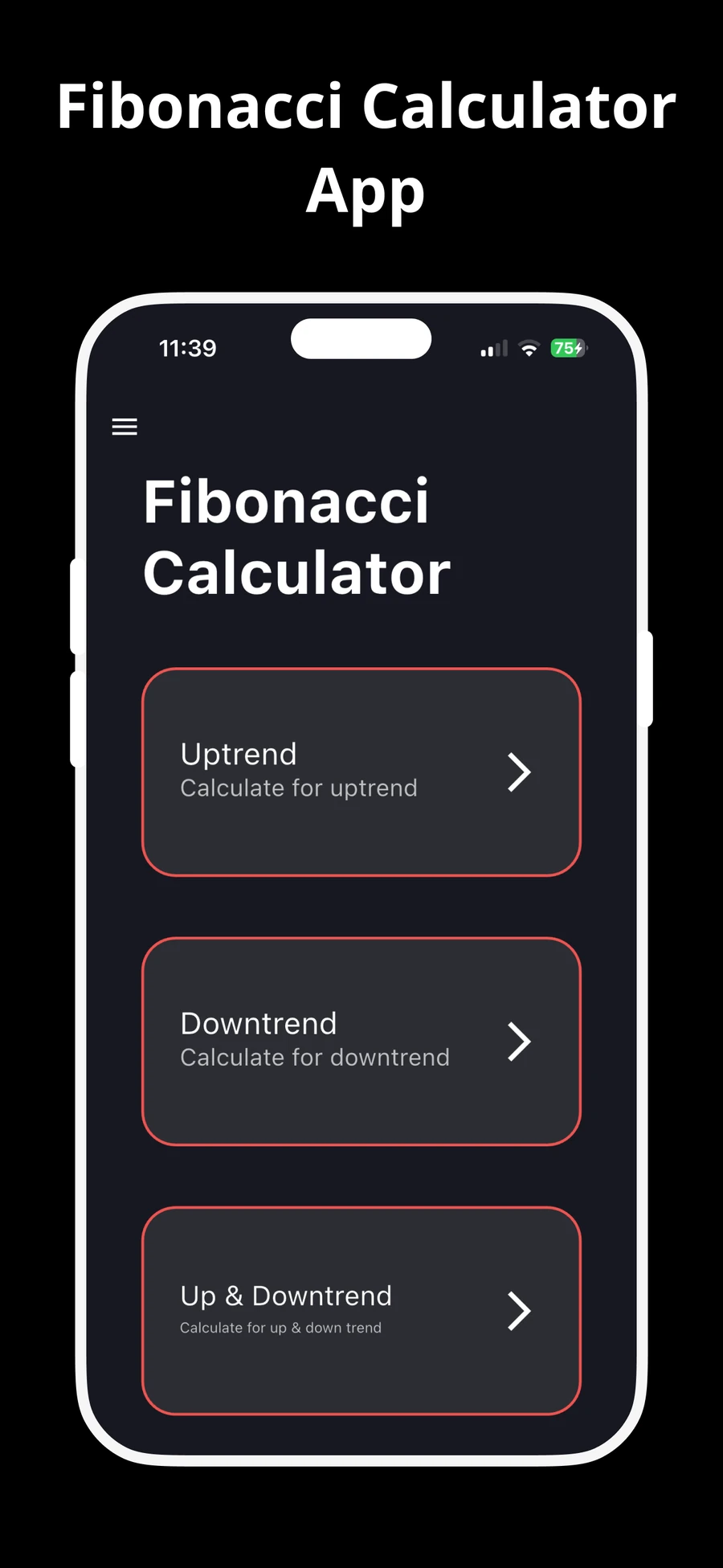
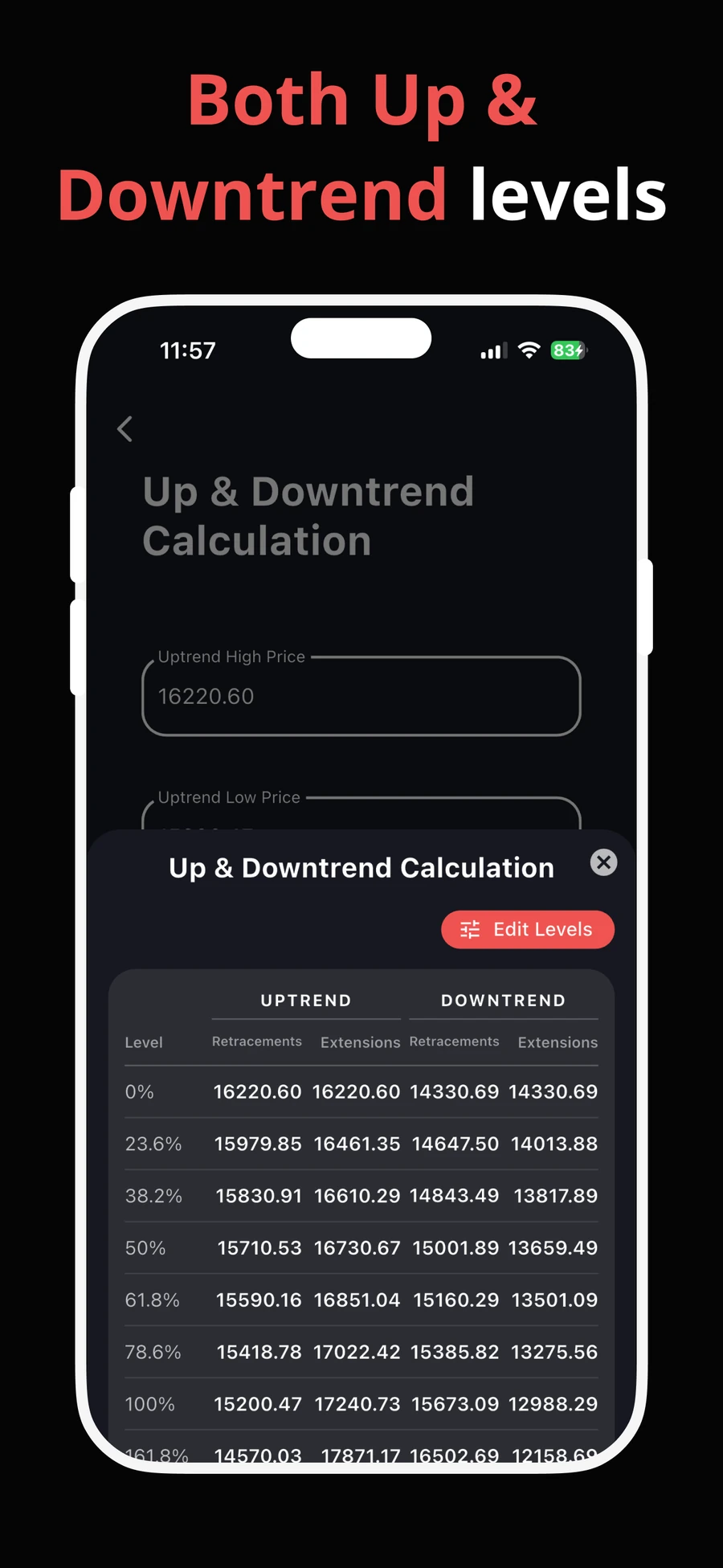
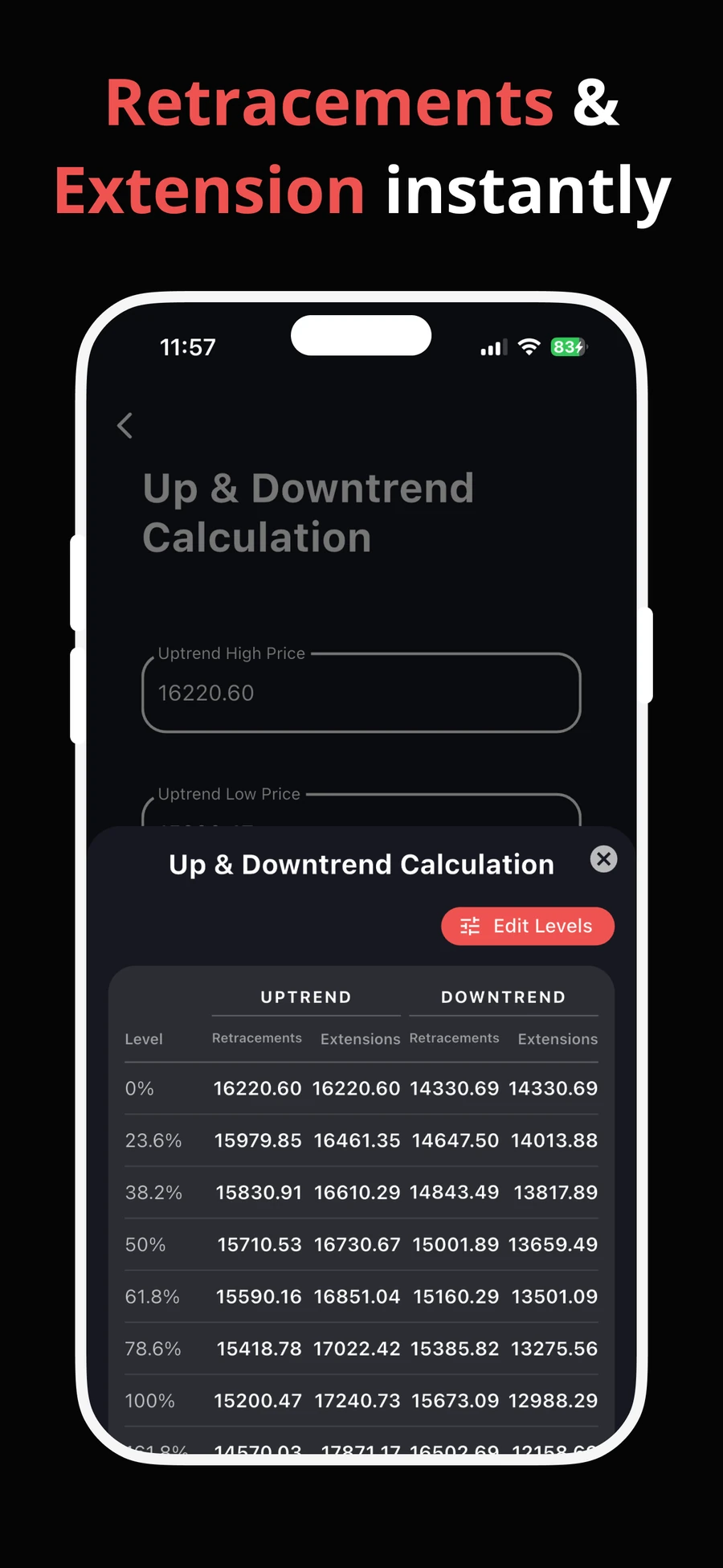
The Fibonacci Calculator home screen under the caption Fibonacci Calculator App. Three cards with red outlines read Uptrend, Downtrend, and Up & Downtrend.Up & Downtrend results under the caption Both Up & Downtrend levels. One table shows Uptrend and Downtrend retracements and extensions side by side, with an Edit Levels button above it.

See both directions on one screen

Enter a High and Low for the rise and another pair for the fall. Up & Downtrend lays all four columns out in one table, so you compare both sets of levels without switching screens.

  • Read Uptrend and Downtrend levels together
  • Compare support and resistance at a glance
  • Tap Edit Levels to choose which levels you see

Every level, worked out for you

Start with the nine standard Fibonacci levels. The app calculates all of them the moment you tap CALCULATE, so you never need to remember a formula or do the math by hand.

  • 0%
  • 23.6%
  • 38.2%
  • 50%
  • 61.8%
  • 78.6%
  • 100%
  • 161.8%
  • 261.8%

Enter a High of 120 and a Low of 100 and you get:

61.8% Retracement107.64
161.8% Extension152.36

The table shows all nine levels for the same move.

Uptrend Fibonacci levels for a High of 120 and a Low of 100
LevelRetracementExtension
0%120.00120.00
23.6%115.28124.72
38.2%112.36127.64
50%110.00130.00
61.8%107.64132.36
78.6%104.28135.72
100%100.00140.00
161.8%87.64152.36
261.8%67.64172.36
The Custom Levels screen under the caption Use Custom Levels. Tabs read All Calculators, Uptrend, Downtrend and Up & Downtrend, above Retracement and Extension lists of levels with add, delete and Reset controls and a SAVE button.

Trade with your own Fibonacci levels

Add the levels that fit your trading style and the app calculates them alongside the standard set. Use them to test your own ideas on any instrument.

  • Add or remove levels
  • Set different Retracement and Extension levels
  • Use one list for every calculator, or a separate list for Uptrend, Downtrend and Up & Downtrend
  • Pick any percentage from 0% to 9999.999%
  • Reset to the standard levels any time

Your trading style, your levels. Saving Custom Levels is part of Premium.

Read your levels at a glance

Large numbers on a dark screen keep every level easy to read, even in the middle of a trade.
Made for the way you trade

The calculators only need two prices, so they work the same on every market and every timeframe.

Stocks

Plan entries and exits on shares and indices.

Crypto

Map support and resistance on Bitcoin, Ethereum and altcoins.

Currencies

Find pullback zones on pairs like EUR/USD and USD/INR.

Commodities

Set targets on gold, silver and crude oil.

F&O

Work out levels for index futures and options.

Fits your trading style

From scalps that last minutes to investments you hold for years.

  • Scalping
  • Intraday trading
  • Swing trading
  • Short term trading
  • Positional trading
  • Long term trading
  • Investment

Get your levels in three steps

It takes less time than drawing the Fibonacci tool on a chart.

  1. Pick your trend

    Open Uptrend, Downtrend or Up & Downtrend to match the move on your chart.

  2. Enter the High and Low

    Type the highest and the lowest price of the move. Two numbers are all the app needs.

  3. Tap CALCULATE

    Read every retracement and extension level, then plan your entry, stop and target around them.

The app works out the levels. Every trading decision stays with you.

Start free, upgrade when you want more

Calculate Uptrend and Downtrend levels free. Upgrade to Premium to drop the ads, open Up & Downtrend straight away and save your Custom Levels.

Free

Everything you need to calculate Uptrend and Downtrend levels.

  • Uptrend and Downtrend calculators
  • Up & Downtrend after a 20-second showcase of our other apps
  • Try Custom Levels before you upgrade to save them
  • Small banners on calculator screens and a full-screen ad when you leave a calculator
3-day free trial on Yearly

Premium

Calculate without ads and keep your own levels saved.

  • Everything in Free
  • No ads
  • Up & Downtrend opens straight away
  • Save Custom Levels and use them in every calculator
  • Plans can include Monthly, Half-Yearly and Yearly. The Yearly plan starts with a 3-day free trial.
  • Google Play bills you until you cancel, and you can cancel any time from Google Play.
  • Reinstalled the app? Tap Restore Purchase on the plans screen to get Premium back.
  • On iPhone the app shows no ads, Up & Downtrend is part of Premium, and plans can include Weekly and Yearly.

Questions traders ask about Fibonacci levels

What does the Fibonacci Calculator app do?

Fibonacci Calculator turns the High and Low of a price move into every Fibonacci retracement and extension level, to two decimal places. It runs on Android and iPhone and has three calculators: Uptrend, Downtrend, and Up & Downtrend. VSB DEVS makes the app.

What are Fibonacci retracement levels?

Retracement levels mark prices where a pullback may pause before the main move carries on. Many traders watch them because prices often pause, bounce or turn near them. The app shows them at 0%, 23.6%, 38.2%, 50%, 61.8%, 78.6%, 100%, 161.8% and 261.8% of the move.

What are Fibonacci extension levels?

Extension levels mark possible targets if a move keeps going past its High in an uptrend, or past its Low in a downtrend. On a rise from 100 to 120, the 161.8% extension sits at 152.36.

How do I calculate Fibonacci retracement levels in an uptrend?

Subtract the Low from the High to get the size of the move. Multiply that by the level, then subtract the result from the High. For a High of 120 and a Low of 100, the move is 20, so the 61.8% retracement is 120 − (20 × 0.618) = 107.64. The app does this for every level when you tap CALCULATE.

How do I calculate Fibonacci extension levels in an uptrend?

Multiply the size of the move by the level and add the result to the High. For a High of 120 and a Low of 100, the 161.8% extension is 120 + (20 × 1.618) = 152.36.

How are Fibonacci levels calculated in a downtrend?

In a downtrend the app works from the Low. Retracement = Low + (High − Low) × level, and Extension = Low − (High − Low) × level. For a High of 120 and a Low of 100, the 61.8% retracement is 112.36 and the 161.8% extension is 67.64.

Which Fibonacci levels does the app show?

Every calculator starts with nine standard levels: 0%, 23.6%, 38.2%, 50%, 61.8%, 78.6%, 100%, 161.8% and 261.8%. Add your own with Custom Levels and save them with Premium.

Can I use my own Fibonacci levels?

Yes, with Custom Levels. Add or remove levels, keep different retracement and extension lists, and use one list for every calculator or a separate list for each. Any percentage from 0% to 9999.999% works, and Reset brings back the standard levels. Saving your levels needs Premium, and the app keeps them on your phone.

What is the Up & Downtrend calculator?

Up & Downtrend shows the levels for a rise and a fall on one screen. Enter a High and Low for each move and read both sets of levels side by side. On Android it opens free after a 20-second showcase of our other apps, which needs an internet connection. Premium members open it straight away.

Does the calculator work for stocks, F&O, forex, crypto and commodities?

Yes. The calculators only need two prices, so they work for stocks, index futures and options, currency pairs like EUR/USD, cryptocurrencies like Bitcoin and commodities like gold and crude oil. They suit any timeframe, from scalping to long term investing.

Does the app work offline?

Yes, the calculators work without an internet connection. The Premium plans and the free Up & Downtrend unlock need the internet, and the app shows No Internet Connection when you're offline.

Does the app tell me when to buy or sell?

No. Fibonacci Calculator works out price levels from the two prices you type. It gives no buy or sell signals, predicts no price moves and places no trades. Treat the results as information, not financial advice. Every trading decision stays with you.

Is Fibonacci Calculator free?

Yes. Download the app free and use the Uptrend and Downtrend calculators at no cost. Premium removes the ads, opens Up & Downtrend straight away and saves your Custom Levels. The Yearly plan starts with a 3-day free trial.

How do I cancel or restore Premium?

Cancel any time from Google Play, or from the App Store on iPhone. If you reinstall the app, tap Restore Purchase on the plans screen to get Premium back. Content Unlock Status in the side menu shows your plan and the date it runs until.

Is Fibonacci Calculator available on Android and iPhone?

Yes. Get Fibonacci Calculator on Google Play for Android and on the App Store for iPhone.

Not financial advice

Fibonacci Calculator applies standard Fibonacci formulas to the High and Low you enter. Its results are not financial, investment, tax or trading advice, and they do not recommend buying, selling or holding anything.

Prices do not have to stop at a Fibonacci level. Trading stocks, F&O, forex, commodities or crypto carries real risk, including the loss of all the money you invest. One typo changes every level, so check your numbers before you act on them. You are responsible for every trade you place. The Terms of Use and the Privacy Policy explain this in full.

Your next levels are two prices away

Get Fibonacci Calculator on Google Play or the App Store and calculate your first levels in seconds.